前言 模型本事是无状态的,每次API请求对它来说都是全新的。
在我们日常使用的那些模型中,只是历史消息被塞进了本次请求的上下文中。
Spring AI 的 ChatMemory 就是帮你做这件事情的,即自动管理对话历史,每次发请求的时候自动带上前面的消息。
不用 ChatMemory 如何实现多轮对话 1 2 3 4 5 6 7 8 9 10 11 12 13 14 15 16 17 18 19 20 21 22 23 24 25 26 27 28 29 30 31 32 33 34 35 36 37 38 39 40 41 42 43 44 45 46 47 48 49 50 package com.berial.springai.controller.chatMemory;import org.springframework.ai.chat.client.ChatClient;import org.springframework.ai.chat.messages.AssistantMessage;import org.springframework.ai.chat.messages.SystemMessage;import org.springframework.ai.chat.messages.UserMessage;import org.springframework.web.bind.annotation.PostMapping;import org.springframework.web.bind.annotation.RequestBody;import org.springframework.web.bind.annotation.RequestMapping;import org.springframework.web.bind.annotation.RestController;import org.springframework.ai.chat.messages.Message;import java.util.ArrayList;import java.util.List;import java.util.Map;import java.util.concurrent.ConcurrentHashMap;@RestController @RequestMapping("/manual-chat") public class ManualChatController { private final ChatClient chatClient; private final Map<String, List<Message>> sessions = new ConcurrentHashMap <>(); public ManualChatController (ChatClient.Builder builder) { this .chatClient = builder.build(); } @PostMapping public String chat (@RequestBody ChatRequest request) { List<Message> history = sessions.computeIfAbsent(request.conversationID(), id -> { List<Message> list = new ArrayList <>(); list.add(new SystemMessage ("你是一个java技术助手" )); return list; }); history.add(new UserMessage (request.message())); String reply = chatClient.prompt() .messages(history).call().content(); history.add(new AssistantMessage (reply)); return reply; } record ChatRequest (String conversationID, String message) {} }
ChatMemory 基础用法 Spring AI 内置了基于 Advisor 的 ChatMemory 支持。
最简单的内存版本 1 2 3 4 5 6 7 8 9 10 11 12 13 14 15 16 17 18 19 20 21 22 23 24 25 26 27 28 29 30 31 32 33 34 35 36 package com.berial.springai.controller.chatMemory;import org.springframework.ai.chat.client.ChatClient;import org.springframework.ai.chat.client.advisor.MessageChatMemoryAdvisor;import org.springframework.ai.chat.memory.MessageWindowChatMemory;import org.springframework.web.bind.annotation.GetMapping;import org.springframework.web.bind.annotation.RequestMapping;import org.springframework.web.bind.annotation.RequestParam;import org.springframework.web.bind.annotation.RestController;@RestController @RequestMapping("/memory-chat") public class MemoryChatController { private final ChatClient chatClient; private final MessageWindowChatMemory chatMemory; public MemoryChatController (ChatClient.Builder builder) { this .chatMemory = MessageWindowChatMemory.builder().maxMessages(10 ).build(); this .chatClient = builder.build(); } @GetMapping public String chat ( @RequestParam String message, @RequestParam(defaultValue = "default") String conversationId) { return chatClient.prompt() .user(message) .advisors(MessageChatMemoryAdvisor.builder(chatMemory) .conversationId(conversationId) .build()) .call().content(); } }
调用示例:
同 conversationId :
1 2 3 4 5 6 7 GET http://localhost:8081/memory-chat?message=我是Berial&conversationId=123 #回复:你好,Berial!很高兴认识你。 有什么我可以帮你的吗? GET http://localhost:8081/memory-chat?message=我是谁&conversationId=123 #回复:你是 Berial。
不同 conversationId :
1 2 3 GET http://localhost:8081/memory-chat?message=我是谁&conversationId=123456 #回复:你是此刻正在和我对话的人。如果你是想问现实身份,我其实不知道你的姓名、职业或背景,除非你告诉我。
控制保留的消息数量 1 2 3 4 5 6 7 8 9 10 11 12 13 14 15 16 17 18 19 20 21 22 23 24 25 26 27 28 29 30 31 32 33 34 35 36 37 package com.berial.springai.controller.chatMemory;import org.springframework.ai.chat.client.ChatClient;import org.springframework.ai.chat.client.advisor.MessageChatMemoryAdvisor;import org.springframework.ai.chat.memory.MessageWindowChatMemory;import org.springframework.web.bind.annotation.GetMapping;import org.springframework.web.bind.annotation.RequestMapping;import org.springframework.web.bind.annotation.RequestParam;import org.springframework.web.bind.annotation.RestController;@RestController @RequestMapping("/long-chat") public class LongChatController { private final ChatClient chatClient; private final MessageWindowChatMemory chatMemory; public LongChatController (ChatClient.Builder builder) { this .chatMemory = MessageWindowChatMemory.builder().maxMessages(20 ).build(); this .chatClient = builder .defaultSystem("你是一个 Java 技术助手" ).build(); } @GetMapping public String chat ( @RequestParam String message, @RequestParam(defaultValue = "default") String conversationId ) { return chatClient.prompt() .user(message) .advisors(MessageChatMemoryAdvisor.builder(chatMemory) .conversationId(conversationId) .build()) .call().content(); } }
太少:模型忘得快 太多:每次发送的 Token 增多,费用上升,超出上下文窗口也会报错。 持久化存储 MessageWindowChatMemory 只在内存里,服务一重启历史就没了,生产环境不能用。
Spring AI 把存储层 和裁剪逻辑拆成了两层:
要做 Redis 持久化,只需要实现 ChatMemoryRepository,然后用 MessageWindowChatMemory 包一层就好;
添加依赖 在 pom.xml 里加入 Redis 的 starter
1 2 3 4 <dependency > <groupId > org.springframework.boot</groupId > <artifactId > spring-boot-starter-data-redis</artifactId > </dependency >
配置 Redis 连接 在application.yml 里加上:
1 2 3 4 5 6 spring: data: redis: host: localhost port: 6379 database: 0
自定义 Redis ChatMemory 1 2 3 4 5 6 7 8 9 10 11 12 13 14 15 16 17 18 19 20 21 22 23 24 25 26 27 28 29 30 31 32 33 34 35 36 37 38 39 40 41 42 43 44 45 46 47 48 49 50 51 52 53 54 55 56 57 58 59 60 61 62 63 64 65 66 67 68 69 70 71 72 73 74 75 76 77 78 79 80 81 82 83 84 package com.berial.springai.memory;import com.fasterxml.jackson.databind.ObjectMapper;import org.springframework.ai.chat.memory.ChatMemoryRepository;import org.springframework.ai.chat.messages.AssistantMessage;import org.springframework.ai.chat.messages.Message;import org.springframework.ai.chat.messages.UserMessage;import org.springframework.data.redis.core.StringRedisTemplate;import java.util.ArrayList;import java.util.List;import java.util.Set;import java.util.concurrent.TimeUnit;public class RedisChatMemoryRepository implements ChatMemoryRepository { private static final String KEY_PREFIX = "chat:memory" ; private static final int TTL_DAYS = 7 ; private final StringRedisTemplate redisTemplate; private final ObjectMapper objectMapper; public RedisChatMemoryRepository (StringRedisTemplate redisTemplate, ObjectMapper objectMapper) { this .redisTemplate = redisTemplate; this .objectMapper = objectMapper; } @Override public List<String> findConversationIds () { Set<String> keys = redisTemplate.keys(KEY_PREFIX + "*" ); if (keys == null ) return new ArrayList <>(); return keys.stream() .map(key -> key.substring(KEY_PREFIX.length())) .toList(); } @Override public List<Message> findByConversationId (String conversationId) { String key = KEY_PREFIX + conversationId; List<String> rawMessages = redisTemplate.opsForList().range(key, 0 , -1 ); if (rawMessages == null ) return new ArrayList <>(); List<Message> messages = new ArrayList <>(); for (String raw : rawMessages) { try { MessageRecord record = objectMapper.readValue(raw, MessageRecord.class); if ("USER" .equals(record.role())) { messages.add(new UserMessage (record.content())); } else if ("ASSISTANT" .equals(record.role())) { messages.add((new AssistantMessage (record.content()))); } } catch (Exception ignored) {} } return messages; } @Override public void saveAll (String conversationId, List<Message> messages) { String key = KEY_PREFIX + conversationId; redisTemplate.delete(key); for (Message message : messages) { try { MessageRecord record = new MessageRecord ( message.getMessageType().name(), message.getText() ); redisTemplate.opsForList().rightPush(key, objectMapper.writeValueAsString(record)); } catch (Exception e) { throw new RuntimeException ("存储消息失败" , e); } } redisTemplate.expire(key, TTL_DAYS, TimeUnit.DAYS); } @Override public void deleteByConversationId (String conversationId) { redisTemplate.delete(KEY_PREFIX + conversationId); } record MessageRecord (String role, String content) {} }
注册为 @Bean:用 RedisChatMemoryRepository 作为底层存储,外面包一层 MessageWindowChatMemory 对外暴露 ChatMemory:
1 2 3 4 5 6 7 8 9 10 11 12 13 14 15 16 17 18 19 20 21 22 23 24 package com.berial.springai.config;import com.berial.springai.memory.RedisChatMemoryRepository;import com.fasterxml.jackson.databind.ObjectMapper;import org.springframework.ai.chat.memory.ChatMemory;import org.springframework.ai.chat.memory.MessageWindowChatMemory;import org.springframework.context.annotation.Bean;import org.springframework.context.annotation.Configuration;import org.springframework.data.redis.core.StringRedisTemplate;@Configuration public class ChatMemoryConfig { @Bean public ChatMemory chatMemory (StringRedisTemplate redisTemplate, ObjectMapper objectMapper) { RedisChatMemoryRepository repository = new RedisChatMemoryRepository (redisTemplate, objectMapper); return MessageWindowChatMemory.builder() .chatMemoryRepository(repository) .maxMessages(20 ) .build(); } }
@Bean 注册好之后,ConTroller 直接注入 ChatMemory 使用,代码和内存版完全一样,只是底层换成了 Redis。
1 2 3 4 5 6 7 8 9 10 11 12 13 14 15 16 17 18 19 20 21 22 23 24 25 26 27 28 29 30 31 32 33 34 35 36 37 38 package com.berial.springai.controller.chatMemory;import org.springframework.ai.chat.client.ChatClient;import org.springframework.ai.chat.client.advisor.MessageChatMemoryAdvisor;import org.springframework.ai.chat.memory.ChatMemory;import org.springframework.web.bind.annotation.GetMapping;import org.springframework.web.bind.annotation.RequestMapping;import org.springframework.web.bind.annotation.RequestParam;import org.springframework.web.bind.annotation.RestController;@RestController @RequestMapping("/redis-chat") public class RedisChatController { private final ChatClient chatClient; private final ChatMemory chatMemory; public RedisChatController (ChatClient.Builder builder, ChatMemory chatMemory) { this .chatMemory = chatMemory; this .chatClient = builder .defaultSystem("你是一个java技术助手" ) .build(); } @GetMapping public String chat ( @RequestParam String message, @RequestParam(defaultValue = "default") String conversationId ) { return chatClient.prompt() .user(message) .advisors(MessageChatMemoryAdvisor.builder(chatMemory) .conversationId(conversationId) .build()) .call().content(); } }
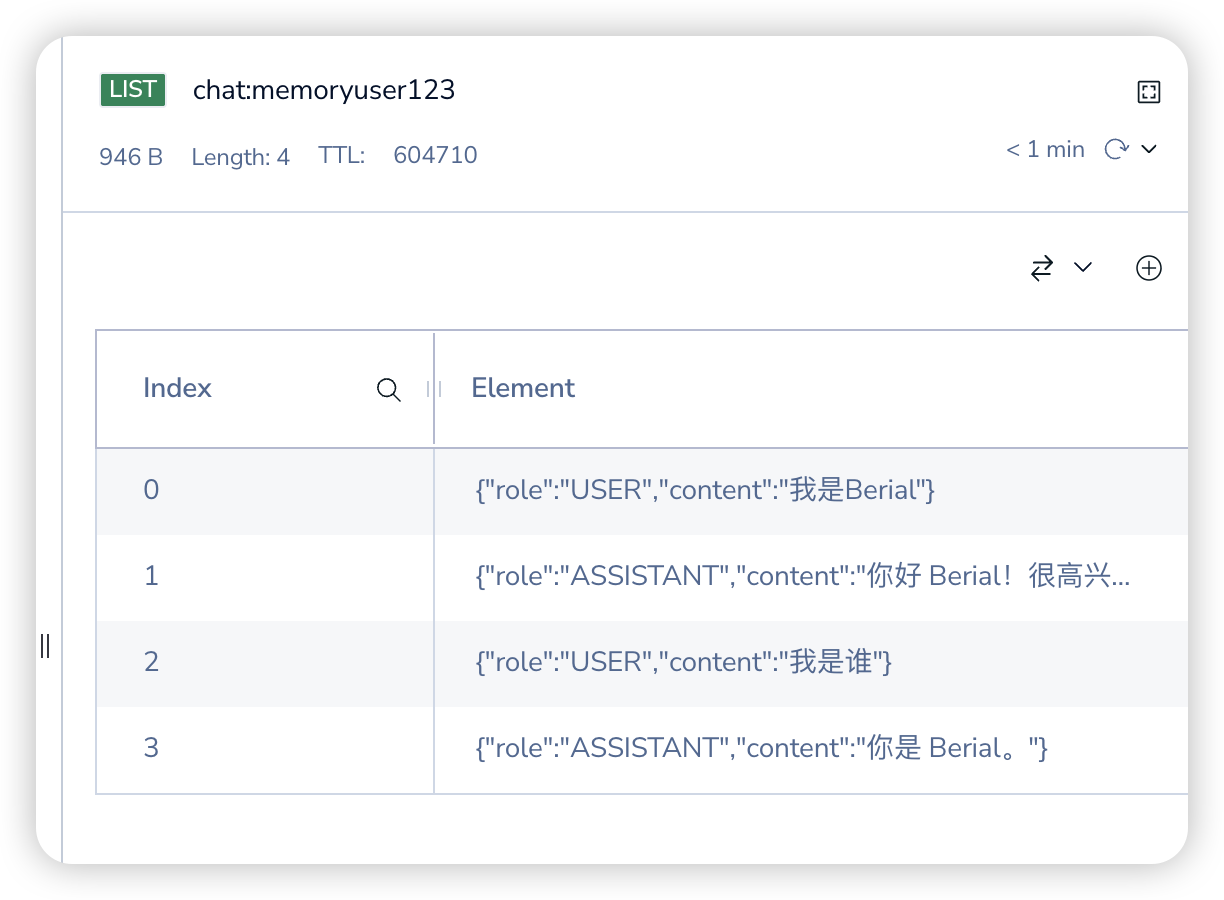
调用示例:
1 2 3 4 5 6 7 8 9 10 11 12 13 14 GET http://localhost:8081/redis-chat? message=我是谁& conversationId=user123 GET http://localhost:8081/redis-chat?message=%E6%88%91%E6%98%AF%E8%B0%81&conversationId=user123 HTTP/1.1 200 Content-Type : text/plain;charset=UTF-8Content-Length : 16Date : Wed, 25 Mar 2026 10:07:27 GMT你是 Berial。 Response code : 200 ; Time : 7947ms (7 s 947 ms); Content length: 10 bytes (10 B)
image-20260325180914125
会话管理:清除历史 用户退出登陆、开启新对话时,需要清除历史;
1 2 3 4 5 6 7 8 9 10 11 12 13 14 15 16 17 18 19 20 21 22 23 24 package com.berial.springai.controller.chatMemory;import org.springframework.ai.chat.memory.ChatMemory;import org.springframework.web.bind.annotation.DeleteMapping;import org.springframework.web.bind.annotation.PathVariable;import org.springframework.web.bind.annotation.RequestMapping;import org.springframework.web.bind.annotation.RestController;@RestController @RequestMapping("/session") public class SessionController { private final ChatMemory chatMemory; public SessionController (ChatMemory chatMemory) { this .chatMemory = chatMemory; } @DeleteMapping("/{conversationId}") public void clearHistory (@PathVariable String conversationId) { chatMemory.clear(conversationId); } }
完整的多轮对话 ConTroller 1 2 3 4 5 6 7 8 9 10 11 12 13 14 15 16 17 18 19 20 21 22 23 24 25 26 27 28 29 30 31 32 33 34 35 36 37 38 39 40 41 42 43 44 45 package com.berial.springai.controller.chatMemory;import org.springframework.ai.chat.client.ChatClient;import org.springframework.ai.chat.client.advisor.MessageChatMemoryAdvisor;import org.springframework.ai.chat.memory.ChatMemory;import org.springframework.web.bind.annotation.*;@RestController @RequestMapping("/api/conversation") public class ConversationController { private final ChatMemory chatMemory; private final ChatClient chatClient; public ConversationController (ChatClient.Builder builder, ChatMemory chatMemory) { this .chatMemory = chatMemory; this .chatClient = builder .defaultSystem(""" 你是一个智能助手。 记住用户告诉你的所有信息,在后续对话中灵活运用。 回答简洁,除非用户要求详细解释。 """ ).build(); } @PostMapping("message") public MessageResponse sendMessage (@RequestBody MessageRequest request) { String reply = chatClient.prompt() .user(request.message()) .advisors(MessageChatMemoryAdvisor.builder(chatMemory) .conversationId(request.conversationId()) .build()) .call().content(); return new MessageResponse (reply, request.conversationId); } @DeleteMapping("/{conversationId}") public void clearHistory (@PathVariable String conversationId) { chatMemory.clear(conversationId); } record MessageResponse (String reply, String conversationId) {} record MessageRequest (String conversationId, String message) {} }
上下文窗口和 Token 预算 每个模型都有最大上下文长度限制(比如 Deepseek-v3 是 128KToken)。历史消息越多,每次请求的 Token 数就越多,超出限制就会报错。
方法:
限制保留消息数 按 Token 数限制(更精确) 定期把历史消息压缩成摘要,用摘要代替原始历史,大幅减少 Token 占用。 在 ChatMemory.get() 里按 Token 数截断,而不是按条数
1 2 3 4 5 6 7 8 9 10 11 12 13 14 15 16 17 18 19 20 21 22 23 24 25 26 27 28 29 30 31 32 33 34 35 36 37 38 39 40 41 42 43 44 45 46 47 48 49 50 51 52 53 54 package com.berial.springai.controller.chatMemory;import org.springframework.ai.chat.memory.ChatMemory;import org.springframework.ai.chat.messages.Message;import org.springframework.stereotype.Controller;import org.springframework.web.bind.annotation.RequestMapping;import java.util.ArrayList;import java.util.List;import java.util.Collections;import java.util.List;import java.util.concurrent.ConcurrentHashMap;class TokenBudgetChatMemoryController {} public class TokenBudgetChatMemory implements ChatMemory { private static final int CHARS_PER_TOKEN = 4 ; private final int maxTokenBudget; private final ConcurrentHashMap<String, List<Message>> store = new ConcurrentHashMap <>(); public TokenBudgetChatMemory (int maxTokenBudget) { this .maxTokenBudget = maxTokenBudget; } @Override public void add (String conversationId, List<Message> messages) { store.computeIfAbsent(conversationId, k -> new ArrayList <>()).addAll(messages); } @Override public List<Message> get (String conversationId) { List<Message> all = store.getOrDefault(conversationId, List.of()); if (all.isEmpty()) return List.of(); List<Message> result = new ArrayList <>(); int tokenCount = 0 ; for (int i = all.size() - 1 ; i >= 0 ; i--) { int msgTokens = all.get(i).getText().length() / CHARS_PER_TOKEN; if (tokenCount + msgTokens > maxTokenBudget) break ; result.add(all.get(i)); tokenCount += msgTokens; } Collections.reverse(result); return result; } @Override public void clear (String conversationId) { store.remove(conversationId); } }
使用方法:
1 2 ChatMemory tokenBudgetMemory = new TokenBudgetChatmemory (2000 );